
Prompt Engineering for Professionals: How to Write AI Prompts That Actually Work (2026)
Most prompt engineering guides are written for people who want prompt engineering to become their job title. That’s not you, and it’s not most of the people reading this. You have a report to write, a job description to draft, or a customer complaint to summarize, and the AI tool you’re using keeps giving you something generic, wrong, or almost-but-not-quite right. This guide is for that problem specifically.
Why Your Prompts Aren’t Working (It’s Rarely What You Think)
The instinctive response to a bad AI output is to type the same request again, louder — more exclamation points, “please be more specific,” maybe in all caps. That almost never works, because the model didn’t ignore you the first time. It answered the question you actually asked, which was probably vaguer than you realized. The fix isn’t intensity. It’s structure — and, just as often, a diagnostic step most guides skip entirely: figuring out why the first attempt fell short before you try again.
The Four-Layer Prompt — Building on What You Already Know
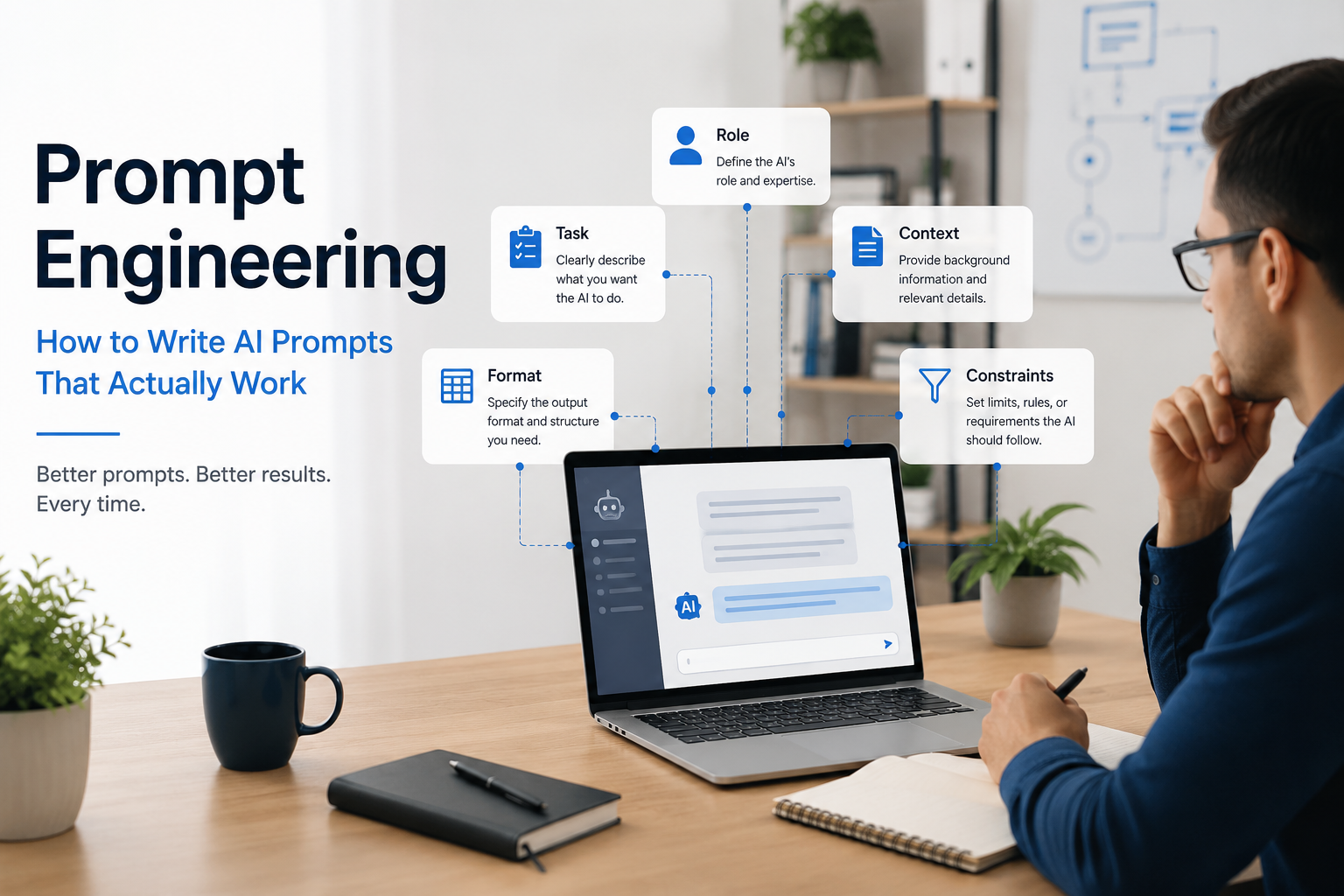
If you’ve read our beginner’s guide, you’ve already met a simplified version of this structure. Here it is again, in depth, because it’s the foundation everything else in this article builds on.
Layer 1: Context
What are you trying to accomplish, and for whom? This is the layer beginners skip most often, because it feels obvious to you and isn’t obvious to the model at all. “I’m drafting a message to a vendor who missed a deadline, and I want to stay firm but not damage the relationship” tells the AI something a bare request never could.
Layer 2: Task
The specific instruction, stated as precisely as you can manage. “Write something about our Q3 results” is a request. “Summarize our Q3 results into three sections readers can scan in under a minute” is a task.
Layer 3: Format
How you want the output structured — bullet points, a table, a specific word count, a particular section order. Skipping this layer is why so many AI outputs come back as a wall of text nobody asked for.
Layer 4: Constraints
What to avoid or what must be included. This is where you rule out the generic-sounding phrases, the overly formal tone, or the assumptions that don’t apply to your situation.
A Complete Example, Layer by Layer
“I’m emailing a vendor who missed a project deadline for the third time [Context]. Write a follow-up email asking for a firm new date and a brief explanation of the delay [Task]. Keep it to under 150 words, professional tone, no more than two short paragraphs [Format]. Don’t threaten to end the contract, and don’t use the phrase ‘moving forward'” [Constraints].
That’s a longer prompt than most people write. It’s also the difference between a usable first draft and three more rounds of frustrated re-typing.
The formula to remember: Context + Task + Format + Constraints. Say it to yourself as one line before you hit send: “What’s going on, what do I want, how should it look, what should it avoid.” If you can answer all four in a sentence each, you have a complete prompt — if you can only answer the second one, you have the bad prompt in every example below.
The Prompt 5 Whys — Our Framework for Fixing a Bad Output
Why “Just Add More Words” Doesn’t Work
Adding volume to a bad prompt without knowing why it was bad is like re-running the same broken experiment expecting a different result. What actually works is the same discipline used in root-cause analysis on a factory floor or a construction site: don’t guess at the fix, ask why until you find the real cause.
The Five Diagnostic Questions
When an AI output disappoints you, work through these in order — you’ll usually find your answer by question two or three, not all five:
- Why is this output wrong or generic? → Often: the task in Layer 2 was vaguer than you thought.
- Why didn’t the AI already know what I meant? → Often: missing context in Layer 1 that felt obvious to you but wasn’t stated.
- Why does the structure feel unusable? → Often: no format instruction in Layer 3.
- Why does the tone or content feel off? → Often: an unstated constraint in Layer 4 — something you needed avoided but never said.
- Why do I keep hitting this same problem repeatedly? → This is the level that matters most and the one people never reach: if the same failure keeps recurring across many prompts, the fix belongs in a reusable template (see the Prompt Library section below), not in a one-off rewrite.
Worked Example: Diagnosing a Disappointing Output
Original prompt: “Write a job description for a marketing role.”
Output: Generic, could describe almost any marketing job at almost any company.
Running the 5 Whys:
- Why is this generic? → The task didn’t specify seniority, focus area, or company type.
- Why didn’t the AI know that? → No context was given about the company, team size, or the specific marketing focus (content? paid ads? product marketing?).
- Why does the structure feel unusable for posting? → No format was requested — a real job posting needs specific sections.
- Why does the tone feel wrong for our company? → No constraint was given about voice — this company’s postings are casual, not corporate.
Revised prompt: “I’m hiring a mid-level content marketer for a 15-person B2B software startup [Context]. Write a job description covering responsibilities, required experience, and nice-to-haves [Task], structured as: a two-sentence company blurb, then three clearly labeled sections [Format]. Casual, friendly tone — avoid corporate phrases like ‘wear many hats’ or ‘fast-paced environment'” [Constraints].
Three of the five diagnostic questions found the actual problem. That’s the point of the framework — it’s faster than guessing, and it teaches you what to include next time without needing to run through it again.
Good vs. Bad Prompts, Across Six Professions
Engineering
- Bad: “Help me check this calculation.”
- Good: “I’m sanity-checking a beam deflection calculation for a warehouse mezzanine, span 6 meters, uniform load 4 kN/m² [Context]. Walk through the standard deflection formula step by step with my numbers, and flag anything that looks unusual before I verify it against code [Task], show the formula, then the substituted numbers, then the result [Format]. Don’t state a final pass/fail judgment — that’s for me to confirm, just show the working” [Constraints].
Business (General Management)
- Bad: “Summarize this report for leadership.”
- Good: “This is a quarterly ops report for a leadership team that only reads the first page [Context]. Summarize the three most important findings and one clear recommendation [Task], structured as a half-page executive summary with a one-line headline per finding [Format]. No jargon, no hedging language like ‘it could be argued'” [Constraints].
Marketing
- Bad: “Write social media posts about our new product.”
- Good: “We’re launching a project management tool for freelancers [Context]. Write five LinkedIn posts announcing it, each highlighting a different pain point it solves [Task], one to two sentences each plus a question to drive comments [Format]. No emojis, no ‘game-changer’ or ‘revolutionary'” [Constraints].
HR / People Ops
- Bad: “Help me write a performance review.”
- Good: “I’m writing a mid-year review for a software engineer who’s technically strong but misses deadlines on cross-team projects [Context]. Draft feedback covering strengths, the deadline issue, and one concrete goal for next quarter [Task], three short paragraphs [Format]. Direct but supportive tone — this is someone I want to retain, not push out” [Constraints].
Education
- Bad: “Make a quiz about photosynthesis.”
- Good: “I’m teaching photosynthesis to 9th graders who’ve had one introductory lesson so far [Context]. Write a 6-question quiz mixing multiple choice and one short-answer question, testing recall and one application question [Task], with an answer key and a one-line explanation per answer [Format]. Keep language at a 9th-grade reading level, no trick questions” [Constraints].
Software Development
- Bad: “Fix this code.”
- Good: “This Python function is supposed to deduplicate a list of customer records by email but is throwing a KeyError on some rows [Context]. Identify the bug and explain why it happens before suggesting a fix [Task], show the corrected function with a one-line comment on each changed line [Format]. Don’t rewrite the whole function’s structure — just fix the bug, I need to keep the diff small for code review” [Constraints].
Before vs. After: What Changes When You Fix a Prompt
Across all five examples above, the pattern is consistent: the “bad” version is a single sentence describing the task alone (Layer 2, with nothing else), and the “good” version adds the three missing layers. The output quality difference isn’t about the AI tool getting smarter between the two attempts — it’s entirely explained by the added context, format, and constraints. This is worth sitting with, because it means the highest-leverage skill here isn’t finding a better tool. It’s this structure.
Does the Tool You’re Using Change How You Should Prompt?
Yes, somewhat — though the Four-Layer Prompt structure works as a foundation across all of them. A few genuine differences are worth knowing, building on our tool comparison guide:
What Claude Responds Best To
Claude tends to follow instructions literally and benefits from calm, direct language rather than urgency — phrases like “CRITICAL” or “YOU MUST” tend to produce worse results, not better, on recent Claude models. For longer or more structured prompts, wrapping distinct sections in simple tags (for example, labeling your example text or background data clearly) tends to help Claude parse what’s example versus instruction.
What Gemini Responds Best To
Gemini tends to do better with a concrete example included rather than none at all, and with your actual question placed at the end of a longer prompt, after your supporting context — not at the beginning.
What ChatGPT and Copilot Respond Best To
Both tend to work well with the straightforward Four-Layer structure as written above, without needing special formatting quirks — their broad training on varied prompt styles makes them comparatively forgiving of how you structure the request, provided all four layers are present.
Common Mistakes Professionals Make
- Writing Layer 2 only, and skipping the other three entirely. This is the single most common failure pattern across every example in this guide.
- Re-typing the same vague prompt louder instead of running the 5 Whys. Volume isn’t structure.
- Assuming a longer prompt is automatically better. Research on model performance suggests reasoning quality can actually degrade past a few thousand words of context — the goal is complete, not maximal. Most work prompts do their best work in the 150–300 word range.
- Never saving anything that worked. If a prompt worked well once, it’ll work again on a similar task — see the Prompt Library section below.
- Ignoring per-model quirks entirely. Small adjustments (see above) can measurably improve results without changing your core structure.
A Simple Length and Complexity Rule
More detail helps up to a point, then stops helping and can start hurting. As a practical guide: if your prompt is longer than a short paragraph and you’re still adding detail, ask whether you’re adding a missing layer (good) or just restating the same layer with more adjectives (not helpful). The Four-Layer structure gives you a natural stopping point — once all four layers are present, more words rarely improve the result further.
Your Prompt Library: Building Reusable Templates
Once a Four-Layer Prompt works well for a recurring task — a weekly status update, a standard incident report, a routine follow-up email — save it as a template with blanks for the parts that change each time. This is the single highest-leverage habit in this entire guide: it turns a one-time win into a repeatable one, and it’s exactly what separates people who get faster with AI over time from people who re-solve the same problem every week.
Prompt Improvement Checklist
Run through this before you hit send on anything that matters — it takes under a minute and catches most of the failures in the Common Mistakes section above before they happen:
- Context: Have I said what I’m trying to accomplish and for whom, not just what I want done?
- Task: Is the instruction specific enough that a colleague reading only this sentence would know exactly what to produce?
- Format: Have I said how the output should be structured — length, sections, bullets vs. prose?
- Constraints: Have I ruled out the tone, phrases, or assumptions I don’t want, not just described what I do want?
- Length check: Is this prompt doing real work in every sentence, or am I repeating the same layer with different adjectives?
- If this is a recurring task: Have I saved this as a template once it works, instead of rewriting it from scratch next time?
If you can check all six before sending, you’re not guessing anymore — you’re applying the Four-Layer Prompt on purpose.
Where to Go From Here
If you haven’t yet, start with our beginner’s guide to see how the Four-Layer structure fits into the broader AI Delegation Matrix, and check our tool comparison guide if you’re deciding which assistant to build your prompt library around. Next in this series: how to verify an AI output before you trust it — a skill that matters even more once your prompts are good enough to sound convincing by default.
Frequently Asked Questions
Do I need to learn special commands or code to write good prompts? No. Every technique in this guide uses plain, ordinary language — the Four-Layer Prompt and the Prompt 5 Whys are both designed for someone with zero technical background.
What is the Prompt 5 Whys? A diagnostic framework for figuring out why an AI output disappointed you, adapted from the root-cause-analysis technique used in safety and quality investigations. Instead of re-typing a vague prompt more forcefully, you ask “why” up to five times until you find the actual missing piece — usually context, format, or an unstated constraint.
How long should a good prompt be? Most effective work prompts land in the 150–300 word range once all four layers (context, task, format, constraints) are present. Longer isn’t automatically better past that point.
Does the AI tool I use change how I should write prompts? Somewhat — see the tool-specific notes above — but the Four-Layer Prompt structure is the foundation across ChatGPT, Claude, Gemini, and Copilot alike.
What’s the single biggest mistake people make with prompts? Writing only the task itself (Layer 2) and leaving out context, format, and constraints entirely — see the Good vs. Bad examples above for what that looks like fixed.